Claim your reward
When a card fills up, Tallyr says so on the card, on the deck and on your code screen. Claiming is one screen at the counter.
Spotting a full card
A card that is ready jumps to the top of the deck with a gift badge and a Claim at the counter button, and the deck header counts them: “3 cards · 2 rewards ready”.
Open the card
Tap it. The card shows a REWARD READY banner, what you have earned, and — underneath — the code to hand over.
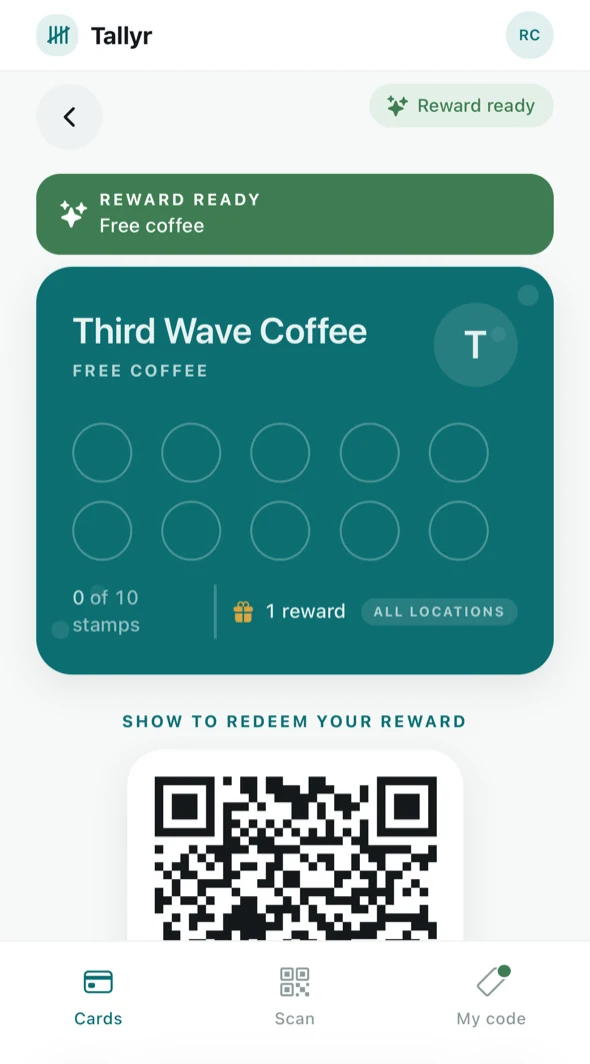
A full card, with its redemption code. Show it at the counter
Under SHOW TO REDEEM YOUR REWARD is a QR the staff member scans. They confirm what you are claiming and hand it over.
You can also start from the My code tab, which shows the same thing and tells you how many rewards are waiting and where.
Keep collecting
Once redeemed, the card starts again from zero and your stamps keep counting towards the next one. A card showing “0 of 10” right after a reward is not a card that lost anything — it is a fresh one.
Rewards do not have to be claimed straight away. They wait on the card until you are next in, and the deck keeps reminding you.
If it will not scan
The redemption code is short-lived for the same reason your everyday code is. If it has expired by the time the staff member scans, reopen the card and show it again.