See your customers
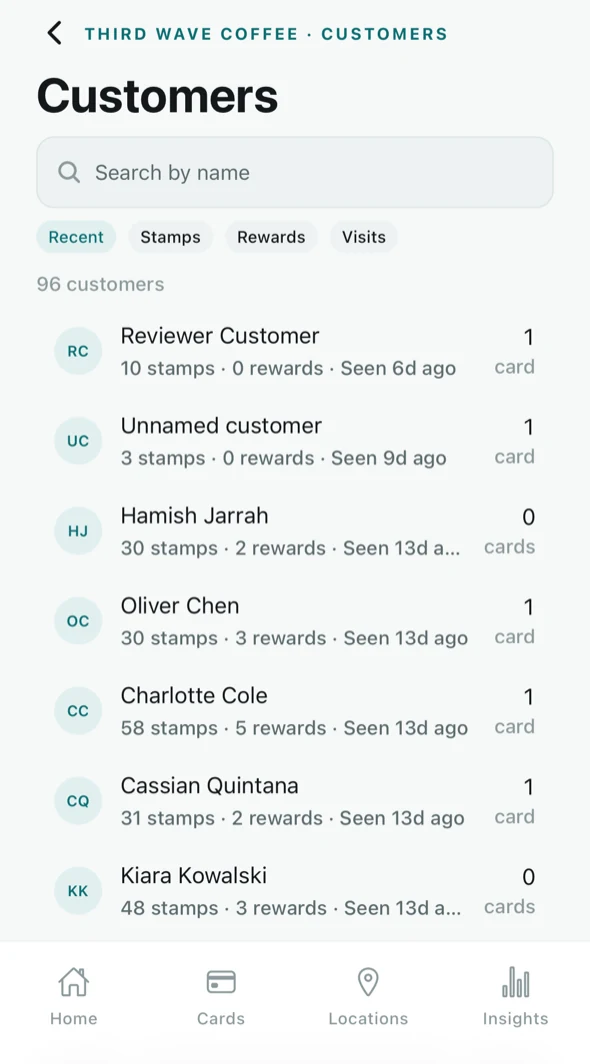
Every customer who has joined one of your cards appears here, with how many stamps they have collected, how many rewards they have taken, and when you last saw them.
Opening the list
Tap View customers on the Home screen — it shows the count, so you can see the list growing without opening it — or reach the same list from the Insights tab.
The customer list, and the two lists further down this page, are Advanced analytics — part of Tallyr Pro. On the Free plan these screens explain what they show and how to upgrade, in place of the list itself. See Your plan and billing.
Finding someone
- Search by name — the box at the top.
- Sort — the chips beneath it reorder the list by Recent, Stamps, Rewards or Visits.
Each row shows stamps collected, rewards redeemed, when they were last seen, and how many of your cards they hold. Tap a row to open that customer.
What the numbers mean
- Stamps — every stamp you have ever given them, across all your cards.
- Rewards — completed cards they have redeemed.
- Seen — the last time they were stamped or redeemed.
- Cards — how many of your loyalty cards they currently hold. A regular who has just cashed one in can legitimately show zero.
Some customers show as an unnamed customer. That is someone who joined by scanning your poster but has not filled in a name — their stamps and rewards still count normally.
Two lists worth knowing
The Insights tab surfaces two slices of this list that are more useful than the whole thing:
- Close to a reward — people one or two stamps from earning something.
- At risk — regulars who have stopped coming in.
Both open the full list behind them, so you can see everyone rather than just the top few. See Read your insights.
Adding stamps by hand
Forgot to stamp someone, or want to put a mistake right? Open the customer, then Add stamps on the card in question. Choose how many stamps (1 to 10) and give a Reason; Tallyr records who added them and why, and the card and its Wallet pass update as if they had been scanned.
Downloading your list
Export CSV at the top of the list downloads every customer as a spreadsheet file: name, active cards, total stamps, visits, rewards redeemed, and when you first and last saw them. It never includes an email address, phone number or birthday. Keep the file somewhere safe; it is your customers’ information.
Tallyr holds the minimum it needs to run your loyalty program, and what you can see about a customer is what these screens show. The Privacy Policy sets out exactly what is stored and for how long.