Show your code
One screen does the whole job at the counter. It carries a QR for staff to scan and six characters you can simply read out.
Open the My code tab as you reach the counter.
Or scan the venue’s QR poster: that asks the team for your stamp, and they confirm it. See Ask for a stamp. Your code is still how you claim a reward.
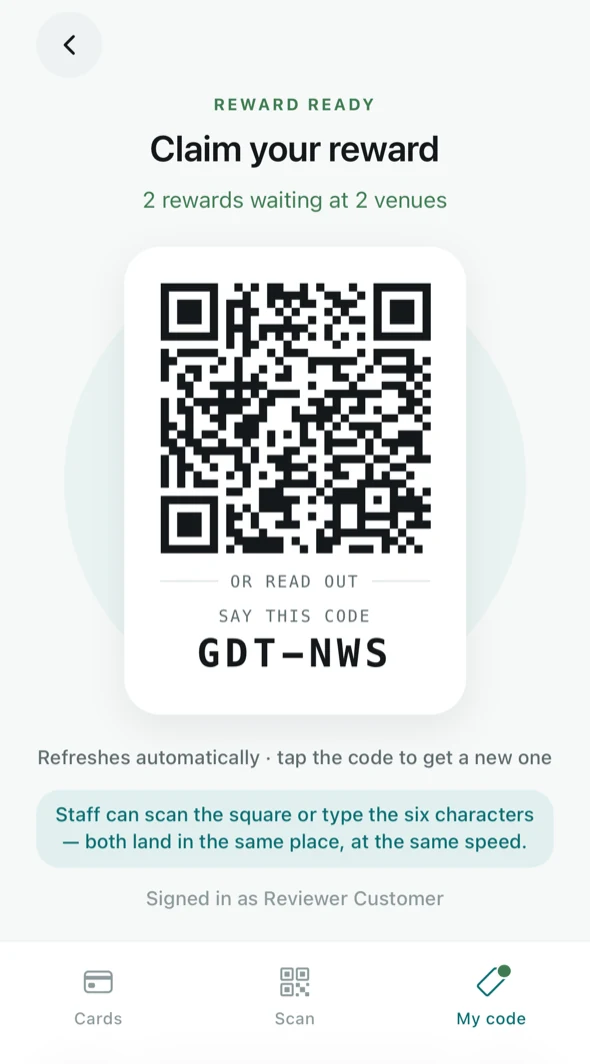
- The square — the staff member points their camera at it.
- The six characters — under SAY THIS CODE. If the light is bad or their camera is being difficult, say them out loud instead. Both land in the same place, at the same speed.
Why it keeps changing
The code refreshes on its own every minute or so. That is deliberate: a screenshot of your code is useless to anyone else a minute later, so nobody can collect stamps as you. You can also tap it to get a fresh one immediately.
If a staff member says the code has expired, it is not a fault — just show them the screen again.
When a reward is waiting
The same screen changes to Claim your reward and tells you how many are waiting and at how many venues, so you do not have to remember. Claiming is covered in Claim your reward.