Stamp requests
A customer scans the QR poster at your counter, and Tallyr sends your team a stamp request. Staff approve it, which opens the usual stamp sheet, or decline it. Nothing is ever stamped automatically.
The customer scans your poster
With their phone camera, or with the Scan tab in Tallyr. The scan sends the request by itself: there is no extra button for them to find. Someone new is signed up by the same scan, which is what the poster says — “New here? The same scan signs you up. We'll confirm it at the counter.”
A customer who is not signed in signs in first, with an email code. If they finish within 15 minutes of scanning, the request goes out then; later than that, they land on their card as before (or choose a card, at a business that runs several), and your staff stamp them the usual way.
It appears at the counter
On a staff phone, the Scan screen shows a pill: No requests, or a count such as 1 stamp request waiting. Tapping it opens the Stamp requests list.
On a tablet or computer by the register, the till screen keeps the same list open beside the scanner, updated live, with a soft chime as each request arrives. See Use the till screen.
Your staff approve or decline
Approve opens the same stamp sheet a scan of the customer’s code opens: check the name, choose how many stamps, add them. Decline asks once to be sure, then tells the customer kindly that no stamp was added. No reason is given or stored.
The stamp is written exactly the way a scanned stamp is, so every normal rule applies: the card has to run at that venue, the venue has to be open, and it lands in your numbers like any other stamp.
The customer sees the outcome
Their screen moves on by itself — Adding your stamp now, then Stamp added with their progress on the card. See Ask for a stamp for every screen they can reach.
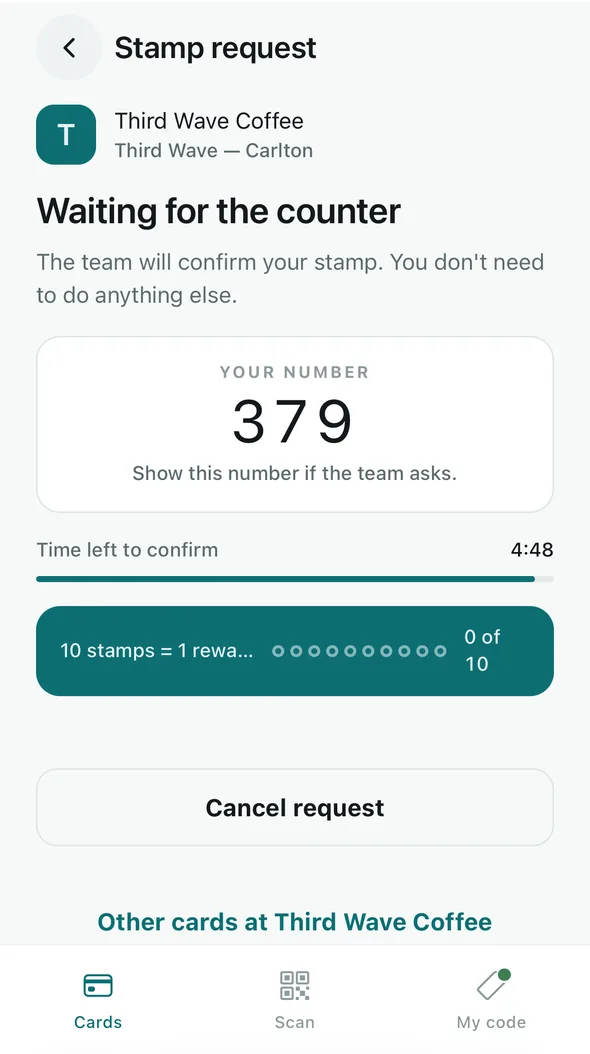
The customer’s side while they wait. Staff see the same number.
Switching your counter onto requests
There is nothing to switch on. Stamp requests work for every business, on every plan, Free included. What is worth doing:
- Tell your team. Staff on a phone find requests behind the pill on the Scan screen. Stamp a customer’s card covers it.
- Put a till by the register, if you have a spare tablet or computer. Set up a till on the poster screen has the seven setup tips, and Use the till screen is the guide.
- Print a fresh poster if you like. New posters say “Scan for your stamp”. Posters already up keep working: their QR does not change, and a scan of an old poster asks for a stamp too, so nothing needs reprinting.
- Serving yourself? Work at counter takes an owner to the same Scan screen your staff use.
What staff see on a request
- The customer’s display name and picture.
- A three-digit number. The customer sees the same number under Your number, so asking for it settles which of two Sams is at the counter.
- The customer’s cards at your business, with how many stamps each has.
- How long the request has been waiting.
Never their email address, phone number or birthday. If a staff member asks for a stamp themselves, the request is marked Your request and a colleague approves it.
The rules every request follows
- A request lasts 5 minutes. If nobody confirms it in time, it ends and the customer is told so.
- A staff member who opens a request holds it for 2 minutes, so two people never stamp the same customer. Colleagues see who is handling it.
- After a decline, the same customer can ask again at that venue after 2 minutes.
- Each customer can make at most 6 requests at one location, and 30 in total, in any 24 hours.
- A location holds at most 50 open requests at once.
- Scanning again while a request is open brings back the same request, with the same number and the same time left. It never adds a second one.
- A request cannot redeem a reward. When the customer has one waiting, the stamp sheet says “A reward is waiting. To hand it over, scan their QR — a request can’t redeem.”
When a customer reaches a limit, their phone says Please ask at the counter and suggests showing their code, so your staff can stamp them by scanning it, as before.
Privacy
A request records who asked, at which venue, when, its three-digit number and how it ended. The customer, that location’s active staff and you can see it. It is erased when the customer deletes their account, and 30 days after it ends. The stamp an approval added stays on the card, like any other stamp.
Staff see the requests for the venues they work at, and no others. For everything else Tallyr stores, see the Privacy Policy.