Get customers joining
Customers scan a QR poster at your counter. The first scan joins them to your card, and every scan asks your team for a stamp. Every location has its own poster, ready to print, with your name and card on it.
Open the poster for a location
Go to the Locations tab, tap the venue, then tap Get QR poster. There is also a QR poster shortcut on the Home screen for your first one.
Each location gets its own code, which is how per-venue numbers stay separate, and how a stamp request reaches the right counter.
Print it and put it where people pay
The poster already says what it needs to: your business name, “Scan for your stamp”, “New here? The same scan signs you up. We'll confirm it at the counter.”, and under the code, “Use your phone's camera — no app needed.”
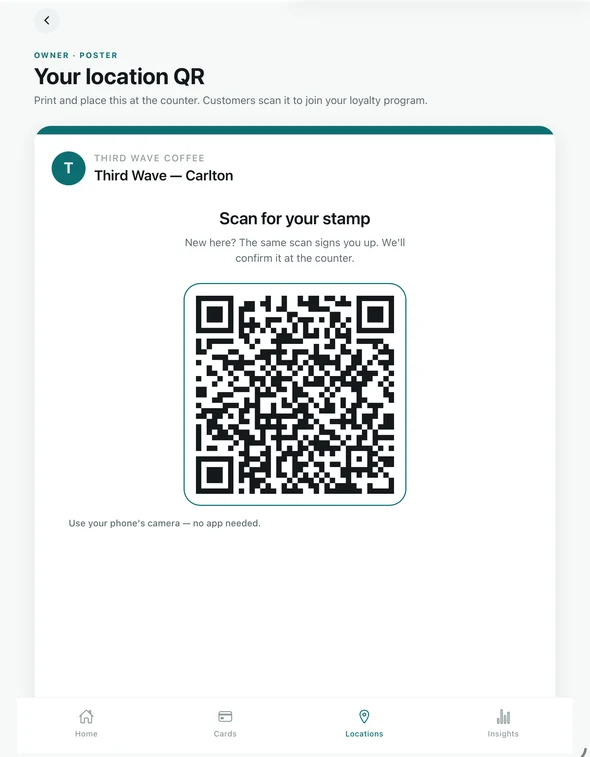
The QR poster for a location. Download PDF downloads it, or Email to myself sends it to your inbox. Put it at the point of payment — the counter, the till, the card machine. That is where the customer is already standing still and already thinking about the purchase.
Already have a poster up?Posters you printed before keep working exactly as they are, older wording and all. The QR on them does not change, and a scan of an old poster asks for a stamp too, so nothing needs reprinting.
What the customer sees
Scanning opens Tallyr in their browser and offers your card. They do not need to install anything to join, and the card lands in the same place as every other Tallyr card they hold.
The same scan sends a stamp request to your counter. Their phone shows “Waiting for the counter” and a three-digit number; your staff approve the request, which opens the usual stamp sheet, or decline it. Nothing is stamped until someone does. See Stamp requests.
On later visits they can scan the poster again, or show their code and have your staff scan it, as before — see Invite and manage your staff.
Getting it in front of people
The poster does the work, but only if people see it. What tends to matter:
- Keep it at eye level at the counter rather than on a side wall.
- Have staff mention it while the card machine is thinking — that is dead time anyway.
- Put one at every venue. Each has its own code, and a customer can join at any of them.
You can check whether it is working from the Locations tab: each venue shows Scans today and Rewards this week, and Insights breaks new customers out from returning ones. See Read your insights.